
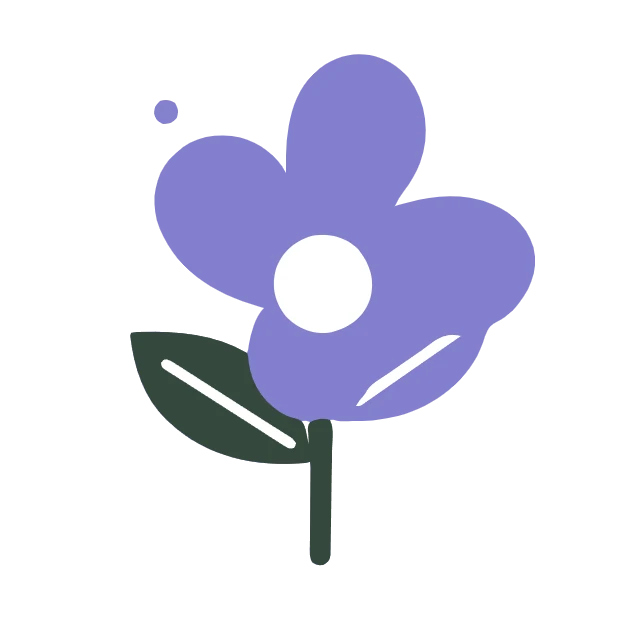
Follow a deliberately simplified four-color trace and see where the palette reduction changes the artwork. Open PNG to SVG.
Upload a clean transparent PNG
Open PNG to SVG and upload a PNG, or try the flower sample. Use a clear source with enough pixels to define its edges. Transparency is useful for isolated artwork, but a transparent background does not turn a bitmap into a vector.
Choose Logo as a starting point. Keep Color mode. To reproduce this example, set Colors to 4 and Detail to 4. The deliberately reduced palette shows how tracing can change a design.
Sharp, flat artwork traces more cleanly than screenshots with blurred or compressed edges.
Reduce colors and inspect the trace
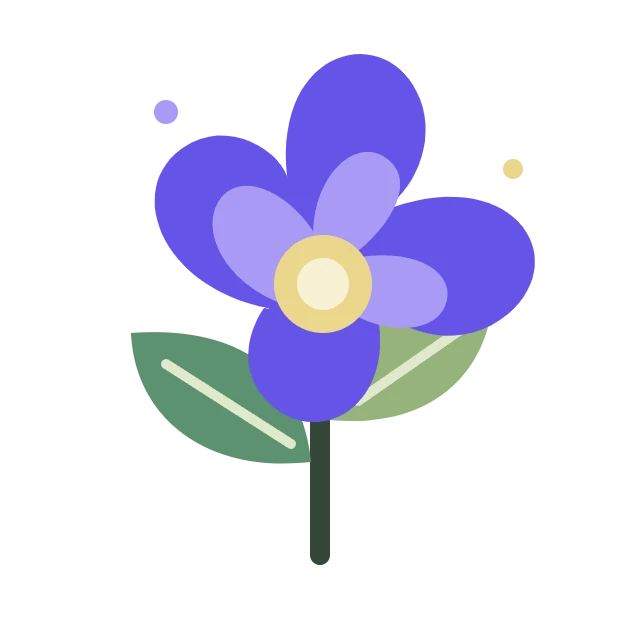
Select Update preview. Switch between Original and Vector, or move the Compare divider. Several flower colors merge into simpler regions and a small decorative dot disappears. This is a simplified design, not an exact color copy.
Open Refine edges and background. Smooth curves controls edge simplification; Remove small speckles removes isolated marks. The example keeps them at 60 and 4. Increase Colors if palette reduction loses an important distinction.
Leave Background at Preserve transparency. Color tracing retains existing clear areas, but partially transparent pixels are simplified and soft edges can change. An opaque white region remains content; this choice does not automatically remove it.
Strong speckle cleanup can remove dots, punctuation or decorative marks that belong in your design.
The example in this guide
Preset: Logo, then Colors: 4 and Detail: 4; Color mode; Smooth curves: 60; Remove small speckles: 4; Background: Preserve transparency.
- Input
- 640 x 640 px
- Output
- 640 x 640 px
- Input file
- 23,812 bytes
- Downloaded file
- 8,739 bytes
- Vector paths
- 7
Download and edit the SVG
Select Start and save the SVG. This example has a 640 x 640 canvas, seven paths and a size of 8,739 bytes. The source PNG is 23,812 bytes, but other artwork can produce a larger SVG.
Open the file in a vector editor to adjust paths and fill colors. Keep the PNG when exact shading matters. Tracing cannot reconstruct layers, fonts or shapes hidden behind other objects.
For multiple PNGs, the same settings apply and results form a ZIP. Preview traces use up to a 1200-pixel longest side; final traces use up to 2048 pixels and retain the original canvas dimensions.
The article shows a WebP rendering of the real output. Download the SVG itself for editable vector paths.
Common questions
Will the clear background remain?
Color tracing preserves clear regions with Preserve transparency. Semi-transparent pixels are simplified, so fades can change.
Why do some colors merge?
Colors limits the palette. Similar or small regions can merge; raise Colors and update the preview for more distinctions.
Does this remove white backgrounds?
Color tracing treats opaque white as content. Preserve transparency retains existing transparency rather than identifying a subject.
Can I edit letters as text?
Letters become outlines. You can edit their shapes, but they are not recognized as editable text with a font.
Try the workflow with your own image, and keep your original file for future edits.
Try a sample or use your own file, and review the result before sharing.