
Follow a verified example, then adapt the controls to your own image. Open Meme Generator.
Choose a picture and layout
Open Meme Generator and choose Robot reaction to follow this example. Two moods starts a two-picture comparison instead. You can also upload your own supported image, up to 25 MB. The original robot artwork is included with the tool; this tutorial does not use a third-party meme-template image.
Keep Classic for text over a picture. Headline and The punchline add a white caption band, while Expectation / reality and What they think give you two independently replaceable pictures. Spotlight adds a white frame. Choose the layout before writing: switching layouts replaces its starter text and arrangement.
A recognizable subject and one short idea usually work better than several paragraphs.
Type and move the punchline
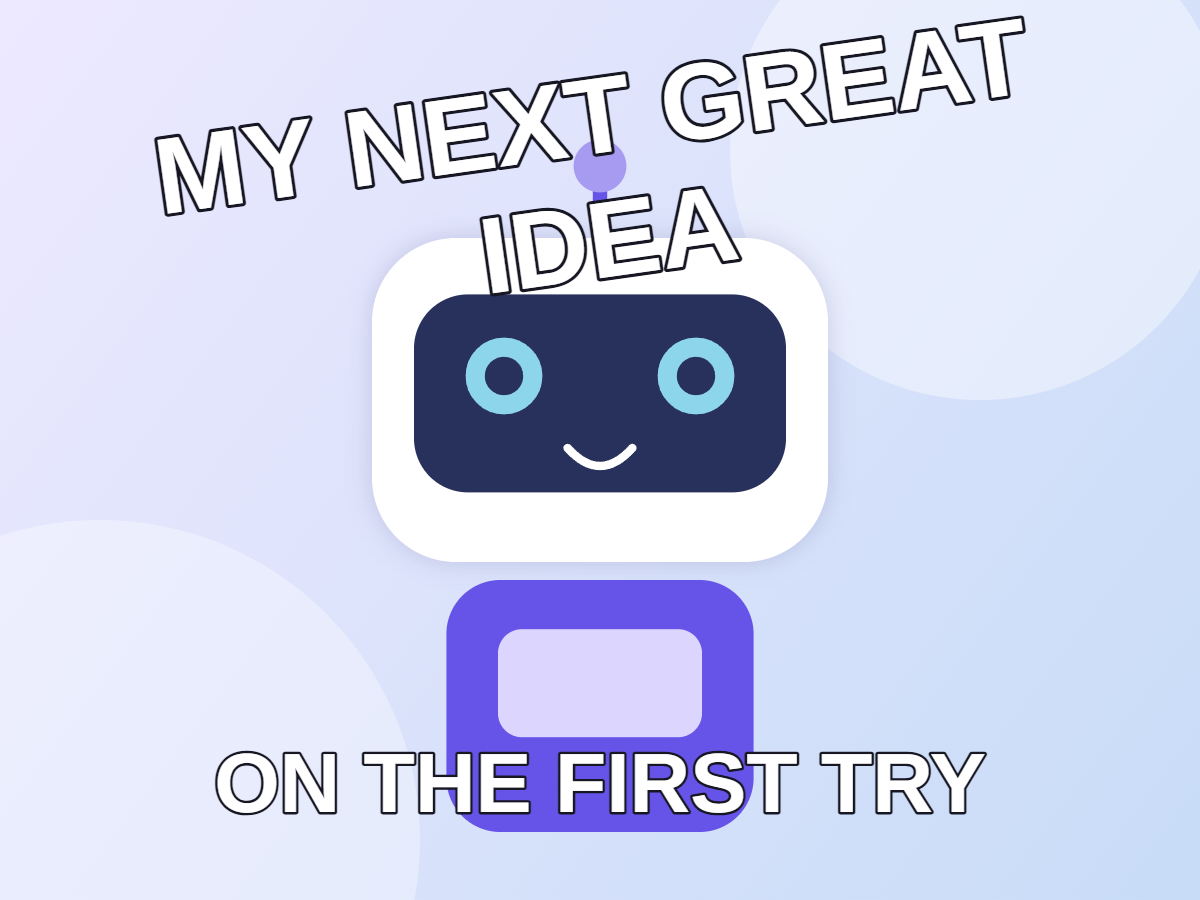
Click or tap the top caption and replace it with MY NEXT GREAT IDEA. The text changes directly on the image. Drag the move handle beneath the selected caption to place it a little lower. In the recorded example, the pointer moves down 18 CSS pixels at the demonstrated mobile preview size.
Keep the second starter caption for the example. Add text creates more captions, up to 16 layers and 1,000 characters in each. Duplicate caption copies the selected layer; Bring to front changes the order when text overlaps; Delete caption removes it. Undo and Redo let you recover recent changes.
Drag the dedicated move handle when you want to reposition text; tap the letters when you want to rewrite them.
The example in this guide
Original robot sample; Classic layout; top caption MY NEXT GREAT IDEA; moved slightly down in the live preview; text size 108 px; rotation -8 degrees; default second caption; PNG. Source and result were captured from the actual current tool.
- Source
- 1200 x 900 px
- Output
- 1200 x 900 px
- Format
- PNG
- Processing
- In your browser
Refine the font and appearance
Open Font in the floating toolbar. Set Text size to 108 pixels and Rotation to -8 degrees to reproduce this export. The default source canvas is 1200 by 900 pixels, so the size is measured against the actual output rather than your browser zoom. Text width controls wrapping; the alignment buttons place lines left, center or right.
Use the B, I and Aa controls for bold, italic and uppercase. Text appearance controls fill color, opacity, outline and background. Choosing an outline or background color enables that effect. Use system fonts asks the browser for access to local fonts where supported; the included fonts work without permission.
Every template picture can be changed. A single-photo layout has Replace image beneath the canvas. Two-photo layouts have a replace button on each panel, and the Images card provides the same options. Fill the frame can crop picture edges; Show the whole image keeps the complete source visible.
Keep contrast high and check that a rotated caption stays within the canvas. Shorter text is often the best readability adjustment.
Create and download the meme
Choose PNG, then select Start. On the result page, use Download to save the image. This worked example produced a real 1200 by 900 pixel PNG with the edited top caption, the second caption and no added watermark. The comparison below uses that downloaded file.
PNG is a good choice for crisp lettering. JPG and WebP can reduce file size with compression. The downloaded result is a static flattened image, so captions are no longer separate editable objects. Make alternative versions while the editor remains open; refreshing the editor or result page returns to the tool page.
Check the exported file at its real size before sharing it in a small chat or social preview.
Common questions
Is this meme maker free and watermark-free?
Yes. Create and download a meme without signing up or adding an i2IMG watermark.
Can I use two different photos?
Yes. Choose Expectation / reality or What they think, then replace image 1 and image 2 independently.
How do I edit text on a phone?
Tap a caption to type in place. Use its move handle to reposition it, and Font for size, width, alignment and rotation.
Can I use fonts installed on my computer?
Use system fonts requests browser permission to read available local font names where that browser supports the feature. Included fonts work without that permission.
Can I edit the captions after downloading?
The downloaded PNG, JPG or WebP is a flattened image. Keep the editor open to make alternatives; the download does not contain separate text layers.
Does uploading a GIF create an animated meme?
No. This tool uses a still frame and exports a static image. Choose GIF Maker when you need animation.
Put the punchline where it belongs.
Try a sample or use your own file, and review the result before sharing.